A small shortcut around stubborn file links
Force Download is a lightweight browser extension that helps turn compatible online resources into direct downloads instead of letting them open inside the browser. It is especially useful for files such as PDFs and other direct links that normally launch in a tab, giving users a simpler way to save them locally without digging through extra browser menus or page settings.
Top Recommended Alternative

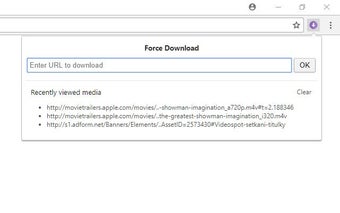
The extension also watches network activity for compatible embedded audio and video files. Detected media links appear in a recent list, giving users another route to save accessible files from webpages. Its scope stays intentionally narrow, though, since it works best with direct resources rather than complex streaming platforms or protected media delivery systems.
Direct links are where Force Download earns its keep
At its simplest, Force Download lets users enter a direct file URL and push that resource toward the browser’s download process. This can save time when a PDF, media file, or similar resource keeps opening in a new tab instead. The focused workflow is easy to understand, although it depends on the website exposing a file that the browser can access directly.
The extension also includes embedded media detection, monitoring network responses for compatible audio and video resources while a page loads. Detected links are collected in a recent-media list containing up to 10 items, which can make finding direct files less tedious. This feature adds useful convenience, although it does not function as a full video extractor or media conversion suite.
That limitation matters on modern streaming sites. Force Download cannot handle services that split videos into many segments instead of providing one complete media file, so platforms such as YouTube fall outside its supported workflow. Browser and website security restrictions also remain in place. According to the developer’s privacy disclosure, the extension does not collect user data, keeping its operation focused inside the browser.
Useful when the file is there to grab
Force Download works best as a focused utility rather than an all-purpose downloader. Direct file handling and automatic media detection make it handy for users who frequently encounter PDFs, audio, or video resources that open instead of saving. However, its usefulness drops quickly when websites rely on segmented streaming, protected delivery, or hidden resources. For straightforward downloads, the extension removes a small but persistent browser annoyance without adding unnecessary complexity.